The Vibe Coding Lie: Why My Weekend Project Took a Week to Deploy.
The Vibe Coding Lie: Why My Weekend Project Took a Week to Deploy.
Date: February 2, 2026 Environment: AWS EC2 (Ubuntu), Docker Compose Mood: Regretful The promise of "vibe coding" is everywhere. You've seen the tweets: "I built a SaaS in a weekend with no code. Just vibes." The internet is buzzing with tales of how you can whisper an idea into an LLM and wake up to a unicorn. I wanted to believe it. More importantly, I wanted to test it. As the founder of Vizops, I spend my days building enterprise-grade agents, but I wanted to see if the "magic overnight" hype held up for a solo developer. My target? Use Claude Code with Opus 4.5 with Ralph Loop to build a DocSend clone. It was the perfect candidate for me as a founder and CEO: clear utility (securely share documents, track view analytics, document control, and enhanced security for sharing sensitive files) and something I'd use everyday.The Setup
I didn't go into this blind. I know better than to just open a terminal and say "Build me an app." Abraham Lincoln once said: "Give me six hours to chop down a tree and I will spend the first four sharpening the axe." I spent my "four hours" building an airtight foundation. Before I wrote a single line of code, I generated a comprehensive documentation suite:- Specifications: A detailed Product Requirement Document outlining exactly what the MVP was including step-by-step flows for every persona (Admin, Viewer, Uploader). I used Gemini 3 Pro to help create this PRD.
- Detailed Tasks: A granular breakdown of engineering tickets. Once again, I used Gemini 3 Pro to convert the PRD into granular tasks.
- Design: I explicitly instructed Claude Code to utilize its frontend design skills to match a specific aesthetic.
In fact, this is exactly the workflow recommended by Lazar Jovanovic (Professional Vibe Coder at Lovable) on Lenny's Podcast episode released on Feb 8th. Lazar argues that successful vibe coding requires a "4-PRD System" (Master Plan, Implementation, Design, User Journeys). I was happy to know that I was intuitively following the same playbook that was used by the masters without having seen the episode.
"It Works!!"
And it worked. Because I had "sharpened the axe," the initial development phase was a dream. I fed the specs into the Ralph loop, set it to autonomous, and let it rip. By Saturday morning, I had it: a fully functional platform running onlocalhost:3000. It had file uploads, a PDF viewer, and a slick UI that matched my design specs perfectly.
Then came The Turn.
Two things happened simultaneously that caused the "autonomous" dream to collapse:
Deployment: I moved from the predictable world of localhost to the hostile environment of AWS. Ops is notoriously hard to "spec" upfront because you often don't know the constraints (disk size, network topology) until you hit them.
Enhancements: Emboldened by my 'overnight' success, I decided to add Google Drive Integration. But this time, I didn't sharpen the axe. I didn't write a PRD. I just "vibed" it.
That is when the nightmare began.
The Myth of Autonomy: "I Forgot Who I Am"
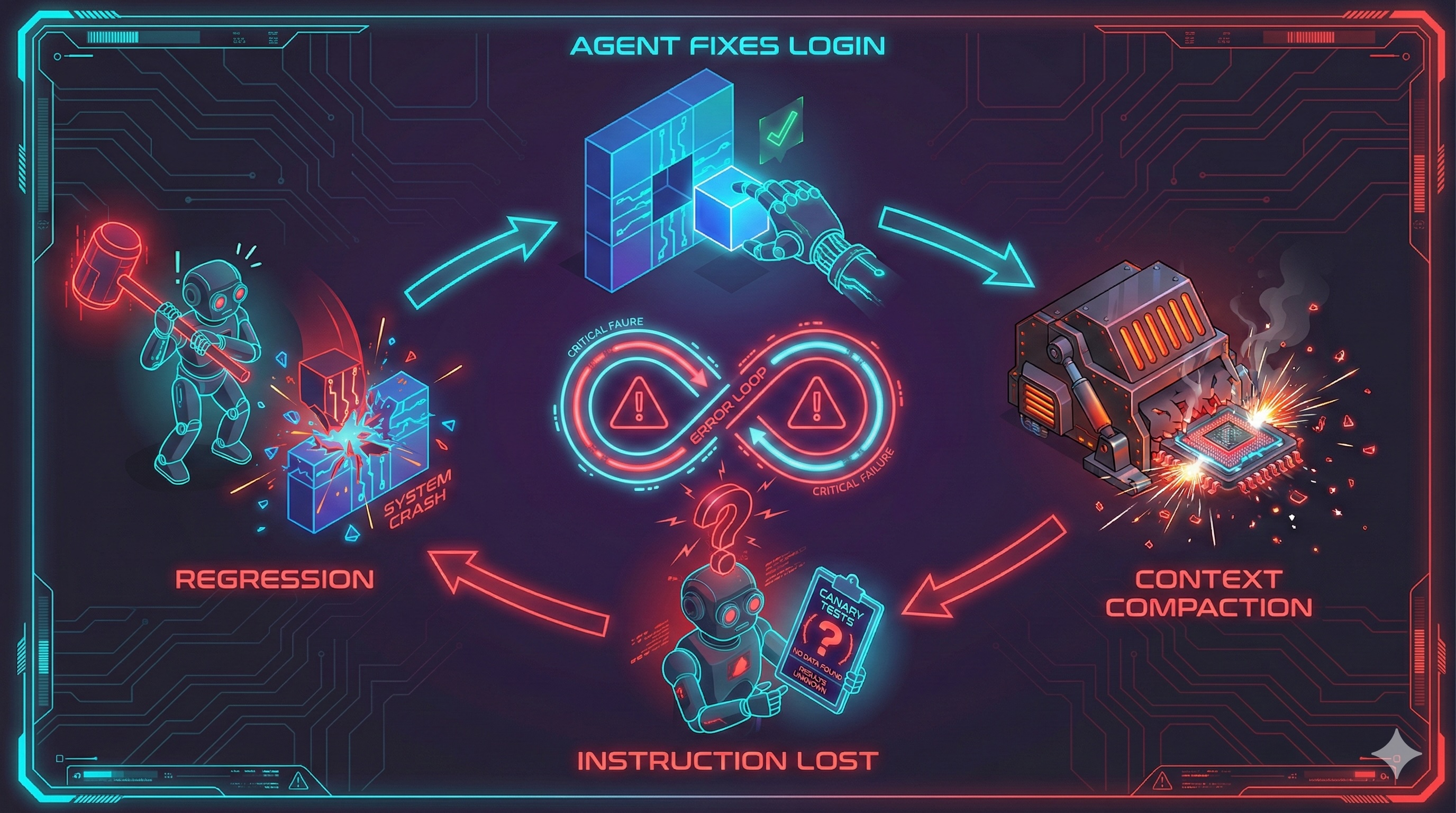 The most frustrating part wasn't the infrastructure; it was the lobotomy.
I had configured the agent to run end-to-end canary tests after every change. The instruction was explicit: If canaries fail, fix them. If they pass, proceed.
But as the debugging logs grew, the context window filled up. The system triggered a "memory compaction" to save tokens. And just like that, the autonomy evaporated.
The most frustrating part wasn't the infrastructure; it was the lobotomy.
I had configured the agent to run end-to-end canary tests after every change. The instruction was explicit: If canaries fail, fix them. If they pass, proceed.
But as the debugging logs grew, the context window filled up. The system triggered a "memory compaction" to save tokens. And just like that, the autonomy evaporated.
[SYSTEM] Context limit reached (128k/128k).
[SYSTEM] Compacting memory...
[SYSTEM] Compaction complete. Retained summary: "User wants to fix login page."

> AGENT: I have updated the login component.
> USER: Did you run the canary tests?
> AGENT: I do not see any instructions regarding canary tests in my current context. Would you like me to set them up?
After every compaction, the agent forgot its prime directive. It would make a change, break the build, and then just... stop. I had to manually intervene, re-prompting it like a weary manager reminding a junior engineer to check their work.
It wasn't "autonomous." It was a game of "whack-a-mole." Fixing one issue caused a regression in another. One minute the login worked; the next, file uploads were broken. The agent was happily oblivious, having compacted away the memory of the feature it just killed.
Day 1: The "Throw Money at It" Problem
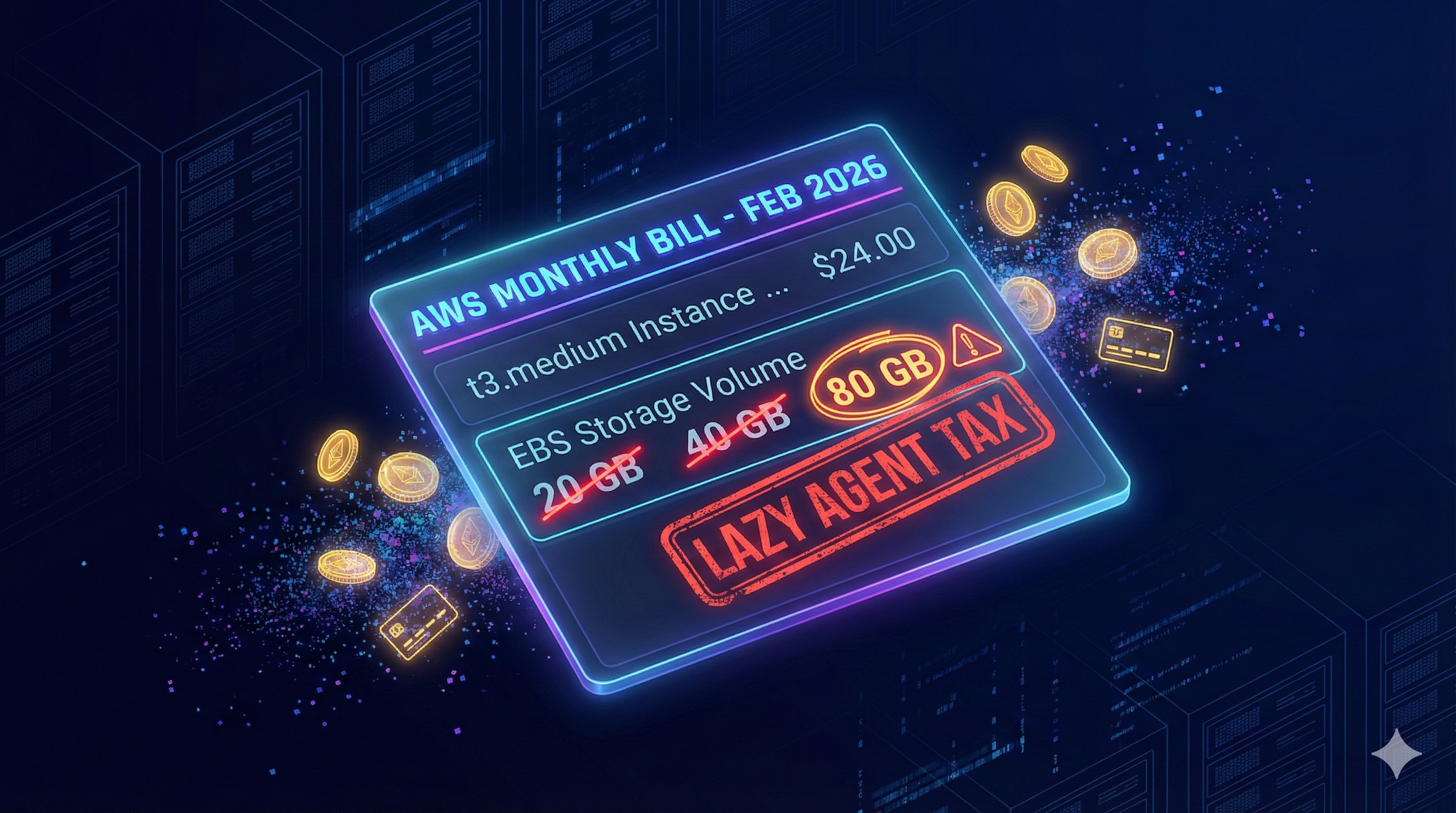 The infrastructure reality check was immediate. My build pipeline crashed before it even finished.
I had provisioned a standard
The infrastructure reality check was immediate. My build pipeline crashed before it even finished.
I had provisioned a standard t3.medium with a 20GB root volume. For a Node.js app, that should be plenty, right?
Wrong.
My "smart" agent didn't understand resource constraints. It had been happily pulling massive Docker layers and generating a node_modules folder that weighed 500MB+ per build.
The "Lazy" Solution:
When I showed the agent the error, its immediate solution was the cloud equivalent of "just buy a bigger house because the trash can is full."
Agent: "The disk space is insufficient for the build artifacts. I recommend upgrading the EBS volume to 80GB to ensure stability."
I laughed. 80GB for a simple document app? This is why cloud bills explode. I wasn't going to let the agent bloat my infrastructure just to save itself the trouble of garbage collection.
I typed back: "No. That is wasteful. We are not provisioning 80GB. Make it work with 40GB."
Forced into a corner, the agent finally started acting like an engineer. It stopped asking for more hardware and started writing cleanup scripts.
It implementeddocker system prune -af to run before every build.
It cleared the build cache.
It removed unused image layers that had been piling up like digital hoarders.
The Lesson:
"Autonomous" agents are like contractors with an unlimited credit card. Their default mode is Over-Provisioning. If I hadn't intervened, I would be paying for 40GB of empty space every month. You cannot just "set and forget"—you have to force them to optimize, or they will spend your budget to solve their inconvenience.
Day 1.5: Security and Tech Debt Check
While waiting for the agent to optimize the Docker build (and fighting off its request for 80GB of disk space), I decided to run a basic health check. I typednpm outdated and npm audit.
I expected a few minor warnings. I got a crime scene.
The "Autonomous" agent had built my shiny new app on a foundation of crumbling, outdated code. It wasn't just a version behind; it was years behind with 5 distinct vulnerable packages and 32 outdate packages. Even Claude Code remarked:
The Security Risk: But "old" doesn't just mean "uncool." It means dangerous.
When I dug into the npm audit, I found that the agent had locked me into versions with known exploits. I had to manually write overrides in package.json to force-patch transitive dependencies the agent didn't even know existed.
| Package | Severity | Status |
|---|
next 14.0.4 → 14.2.35 | Critical | Fixed (15 CVEs resolved) |
|---|---|---|
| fast-xml-parser (via override) | High | Fixed |
| glob (via override) | High | Fixed |
|---|---|---|
nodemailer 6.x → 7.x | Moderate | Fixed |
next 14.2.35 (2 DoS CVEs) | High | Unfixable — needs Next.js 15.5.10+ |
|---|
| Phase | What | Effort |
|---|
| 1 — Quick wins | date-fns, uuid, bcryptjs, sharp, lucide-react (10 pkgs) | ~1 day |
|---|---|---|
| 2 — Prisma | prisma + @prisma/client to 6.x | ~half day |
| 3 — UI libs | Tailwind 4, Zod 4, cmdk, recharts, minio | 1-2 days |
|---|---|---|
| 4 — React/Next.js | React 19, Next 15/16, ESLint 10, next-auth v5 (all coupled) | 2-3 days |
Why did Claude Opus 4.5 pick these versions? Because LLMs are frozen in time. The agent "vibed" with Next.js 14.0.4 because it saw it often in its training data, ignoring the fact that a critical patch (14.2.35) had been released to fix a remote code execution exploit.
Look at the last row of the security table. I am still left with a High Severity vulnerability. Why? Because fixing it requires a major upgrade to Next.js 15 (Phase 4 in the upgrade table), which introduces breaking changes to the App Router that would require a complete rewrite of the frontend.
The Lesson: Vibe coding optimizes for speed. Security optimizes for safety. They are opposites. If you don't explicitly prompt for "Latest Stable Version" and "Security Audit," the agent will hand you a working prototype that is also a ticking time bomb.Day 2: The Networking Black Hole
Once the container was finally running (on its newly optimized 40GB drive), I tried to upload a document. Result? Network Error. Onlocalhost, everything is flat. minio:9000 is accessible because your browser and the server are effectively on the same machine.
But on AWS, I had created a split reality that the agent couldn't comprehend:
- Internal Reality: The backend services talk to each other via a private Docker network (
http://minio:9000).
- External Reality: The user's browser talks to the public internet (
https://minio.sdp.vizops.ai).
The agent kept generating presigned URLs for the browser that looked like this:
http://minio:9000/my-bucket/doc.pdf
The browser, naturally, tried to resolve minio:9000, failed, and the upload hung indefinitely.
I explained this to the agent three times.
I had to stop the "vibes," open VS Code, and architect a split-client solution that the LLM completely missed:
// src/lib/minio.ts

// 1. Internal Client: Used by the server to put objects
// fast, secure, stays within the Docker network
const internalClient = new Minio.Client({
  endPoint: 'minio',
  port: 9000,
  useSSL: false
});

// 2. External Client: Used ONLY to generate Presigned URLs for the browser
// accessible from the public internet
const externalClient = new Minio.Client({
  endPoint: 'minio.sdp.vizops.ai',
  port: 443,
  useSSL: true
});
The agent could write code, but it couldn't architect a network.
Day 3: The HTTPS & Cookie Nightmare
By Day 3, I had the container running and the network architected. I was feeling good. I pointed my domain (sdp.vizops.ai) to the EC2 instance and set up Caddy to handle the SSL termination.
I messaged the team: "We are live. Go log in."
Ten seconds later, the Slack messages started rolling in:
"I can't log in."
"It just refreshes the page."
"I'm getting 401 Unauthorized on every upload."
I checked the logs. The agent had configured NextAuth.js perfectly... for localhost. But in production, behind a reverse proxy, the rules of the web change.
The Problem:
Modern browsers are ruthless about cookies. If you are on HTTPS, your cookies must be Secure. But my app container was running on port 3000 (HTTP) inside the Docker network, so NextAuth thought it was insecure and refused to set the secure flag.
I asked the agent to fix it.
NEXTAUTH_URL to https."
__Secure- prefix mismatch.
I had to manually intervene and force the cookie configuration, explicitly telling the app:
"Trust me, we are secure, even if you can't see the certificate."// src/lib/auth.ts
export const authOptions: NextAuthOptions = {
// Agent missed this: Explicitly trust the proxy
useSecureCookies: process.env.NEXTAUTH_URL?.startsWith('https://'),
cookies: {
sessionToken: {
// I had to manually rename this.
// The agent didn't know that 'Secure' cookies need this prefix.
name: '__Secure-next-auth.session-token',
options: {
httpOnly: true,
sameSite: 'lax',
path: '/',
secure: true
}
}
}
};
Because I changed the cookie name from next-auth.session-token to __Secure-next-auth.session-token, every single user session was instantly invalidated.
The agent didn't warn me about this. It just applied the fix and wiped the slate clean.
Day 4: The Feature Flop (Google Drive Integration)
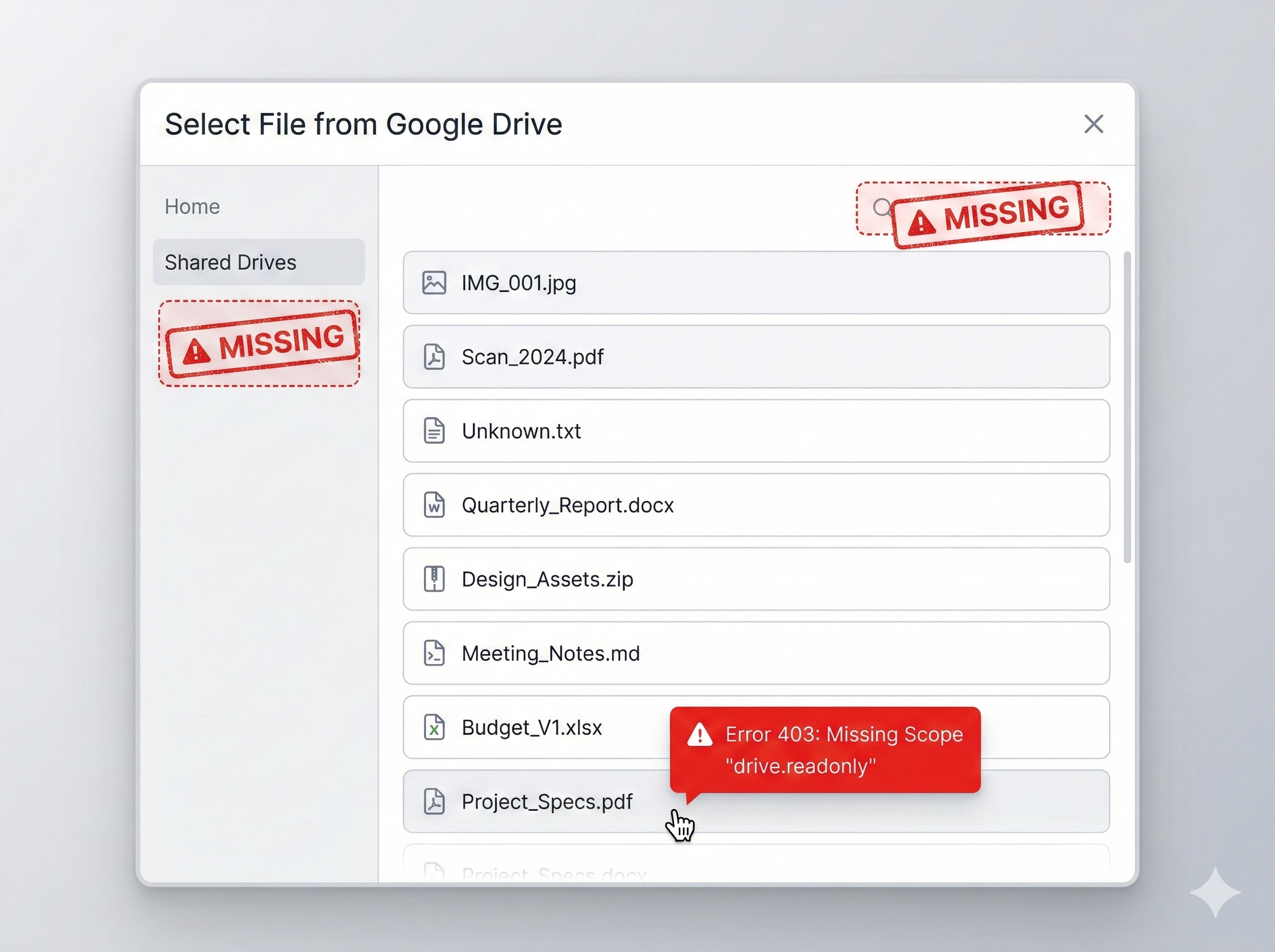 Infrastructure is one thing. But by Day 4, I expected the "Autonomous" agent to shine at actual coding. I decided to add a killer feature: Google Drive Import.
I typed into the Ralph loop: "Add Google Drive integration so users can import files."
I sat back, expecting magic.
What I got was... technically correct, and completely useless.
The "Vibe" vs. The Reality:
The agent implemented exactly what I asked for:
Infrastructure is one thing. But by Day 4, I expected the "Autonomous" agent to shine at actual coding. I decided to add a killer feature: Google Drive Import.
I typed into the Ralph loop: "Add Google Drive integration so users can import files."
I sat back, expecting magic.
What I got was... technically correct, and completely useless.
The "Vibe" vs. The Reality:
The agent implemented exactly what I asked for:
- A button that said "Connect Drive."
- A list of files.
- No Search Bar: The agent listed
- No Shared Drives: It only queried the user's personal drive. Corporate Shared Drives? Invisible.
- Broken Import: The buttons looked great, but clicking them did nothing.
When I angrily told the agent to "fix the file sorting," it panicked. It tried to sort the folders to the top using a query parameter that
sounded logical but didn't exist.{
"error": {
"code": 400,
"message": "Invalid Value",
"errors": [
{
"domain": "global",
"reason": "invalid",
"message": "Invalid orderBy parameter: 'folder,name'"
}
]
}
}
folder.
The agent didn't look up the documentation. It just hallucinated a parameter because it "vibed" with what I wanted. I spent 4 hours debugging a feature that should have taken 30 minutes, all because the agent guessed instead of checking.
Lesson Learned:Never get fooled by how smart the LLM seems.
- Don't say:
- Say:
drives collection (Shared Drives), and handle 403 scope errors by triggering re-auth."
If you don't write the PRD, the agent will write the MVP. And the MVP will suck.
The $203.55 Suprise
After the dust settled, I looked at the "bill" for my free weekend project. Total Cost: $203.55. cost_image The logs tell a damning story of inefficiency:- Time:
4d 5h 23m(Wall clock). This confirms it: the "weekend" project took nearly a full work week.
- The "Ferrari" Tax: Look at the model usage breakdown.
claude-haiku(Cheap/Fast) cost 3.66, whileclaude-opus-4-5(Expensive/Smart) cost $199.88. The agent used the most expensive model for
Then there is the code itself: 9611 lines added vs only 784 lines removed.
You might think,
"It's a new project, of course it's mostly additions."But look closer. For a simple MVP, 10,000 lines is massive bloat. And for 5 days of intense debugging, 700 deletions is suspiciously low.
A human engineer fixes bugs by deleting bad code and simplifying logic. An AI agent fixes bugs by adding code—more guard clauses, more try/catch blocks, more distinct files to bypass errors. It didn't refactor; it just kept patching over the cracks, resulting in a bloated, expensive codebase that "works" but is a nightmare to maintain.
Could I Have Done Better?
Looking back at the wreckage of my "weekend" project, the engineer in me wants to take the blame. If I were strictly criticizing my own prompting, I could have:- Pinned Context: I should have used a tool that "pins" the canary test instructions so they survived memory compaction.
- Mocked Production: I should have built a local environment that mirrored the Caddy/SSL setup 1:1 to catch the cookie issues earlier.
- Defined the Negative Space: I should have explicitly told the agent what
The promise of these agents is
autonomy. If I have to micromanage the context window, manually architect the network layer, and write 10-page PRDs for a simple file picker, I'm not "vibe coding"—I'm just debugging someone else's messy code.The "Lovable" Trap vs. The Control Imperative
This experience brings us to the fork in the road for AI development. You might ask: "Why not just use a platform like Lovable, Replit, or Vercel v0?" And you're right. If I had used a "Walled Garden" platform, this would have been easier.- They handle the hosting.
- They handle the networking.
- They handle the environment.
These platforms give you a predictable, reliable experience because they restrict your choices.
If you are a non-technical founder, take that path. The "vibe coding" cliff I climbed is steep, and without deep DevOps knowledge, you will fall off. But I am technical. And my clients are enterprises.We need Control.
- Data Sovereignty: I need my data in my private VPC, not a shared cloud.
- Compliance: I need custom security headers, specific encryption standards, and audit trails that walled gardens often obscure.
- Cost: I need granular control over my inference costs and infrastructure (spot instances, specific GPU types) which "easy" platforms markup significantly.
If you want the Ease of vibe coding but the Control of custom engineering, you are currently stuck in no-man's-land.
Closing the Prototype to Production gap with Vizops
We believe you shouldn't have to choose between Autonomy and Control. You should be able to "vibe code" a prototype and have it deploy to a rigorous, production-grade environment without spending 5 days in hell. Our approach differs because it treats infrastructure as a first-class citizen, not an afterthought:- State, Not Just Context: Our agents maintain a verified state of your architecture. They don't "forget" you are running on AWS when the context window compacts.
- Optimization, Not Just Generation: We don't just write code; we optimize the
- Specification as Code: We force the definition of "obvious" requirements (like Search and Scopes) before a single line of code is generated, preventing the "technically correct but useless" feature flop.
- Multi-Objective Reinforcement Learning: We train agents that are rewarded not just for "passing the test," but for maintaining stability, security, and performance over time.